Jolly Tunes: A Practical Guide to Integrating Playful Typography into Your Workflow
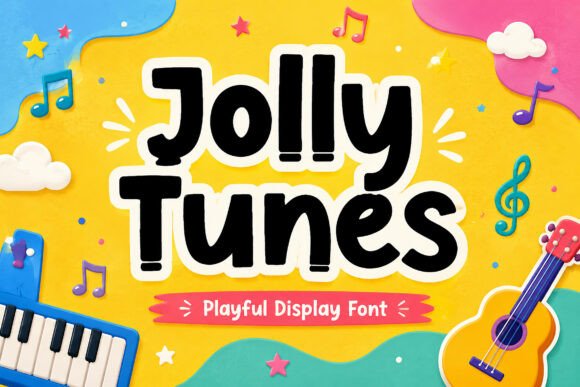
Typography is more than just selecting a font; it is a critical functional component of communication design. When a project requires an atmosphere of happiness, approachability, or childlike wonder, the choice of typeface dictates the viewer's immediate emotional response. Jolly Tunes is a display font specifically engineered to fill this niche. Designed with bold, rounded shapes and a hand-crafted aesthetic, it serves as a distinct tool for professionals who need to convey joy and energy without sacrificing legibility. Understanding where and how to implement a specialized font like Jolly Tunes within your creative and business workflows can significantly enhance the quality and impact of your output.
Understanding the Functional Role of Jolly Tunes
Before integrating any asset into a project, it is essential to analyze its technical and aesthetic properties. Jolly Tunes is categorized as a display typeface, meaning it is optimized for headlines, short phrases, and visual emphasis rather than long-form body copy. Its defining characteristics—bold weight, rounded terminals, and irregular spacing—create a sense of movement and fun.
In the broader design process, this type of font acts as a "tone-setter." When you are in the planning phase of a project, such as designing a children’s book or creating social media graphics, the font choice helps define the brand voice. By selecting Jolly Tunes early in the mood-boarding stage, you establish a visual anchor that aligns with themes of creativity and play. This prevents the common workflow issue of designing a layout with a standard corporate font and then attempting to "force" a playful vibe later, which often results in disjointed design.
Strategic Implementation Across Various Workflows
The utility of a font like Jolly Tunes extends across multiple industries and project types. Its implementation strategy changes depending on the specific workflow, whether it is digital marketing, educational material development, or physical product design.
Digital Marketing and Content Creation
For content creators and marketers, visual hierarchy is crucial for engagement. In the context of YouTube thumbnails or Instagram graphics, the average user decides whether to engage with content in a fraction of a second. Jolly Tunes provides high-contrast legibility at small sizes, making it effective for mobile screens.
Workflow Integration:
- Thumbnail Production: Use Jolly Tunes for the primary hook text. Because the font has a distinct personality, it reduces the need for complex decorative elements or drop shadows to make the text "pop."
- Social Media Branding: Establish a style guide where Jolly Tunes is reserved for call-to-action buttons or emphasis words. This creates a consistent brand voice that audiences recognize instantly.
- Email Headers: In newsletter design, use this font for subject lines or section headers to break up text monotony and inject energy into the reading experience.
Physical Products and DIY Projects
The "hand-crafted" charm of Jolly Tunes makes it particularly valuable for physical goods. For entrepreneurs selling on platforms like Etsy or small business owners creating packaging, the font bridges the gap between digital design and physical texture.
Practical Application:
- Cricut and Cutting Machines: The rounded, bold shapes of Jolly Tunes translate well to vinyl cutting and paper crafting. Unlike script fonts with thin, delicate swashes, the sturdy letterforms of this font are less prone to tearing during the weeding process.
- Toy Packaging and Stickers: When designing packaging, the font must communicate safety and fun simultaneously. Jolly Tunes achieves this by mimicking the organic imperfection of handwriting, which feels more personal and trustworthy to consumers than rigid geometric fonts.
- Birthday Invitations and Stationery: For freelance designers working with clients on events, this font serves as a ready-made solution that balances professionalism with a festive atmosphere.
Educational Materials and Classroom Resources
Educators and publishers often face the challenge of creating materials that are engaging for young learners but still structured enough for readability. Jolly Tunes strikes a balance between "fun" and "functional."
Implementation Tips:
- Readability First: Use Jolly Tunes for headers, instructions, and vocabulary words. Avoid using it for paragraphs of reading text, as display fonts can cause eye strain over long distances.
- Cognitive Association: Consistent use of a specific playful font for certain types of activities (e.g., using Jolly Tunes only for "Game Time" sections) helps students visually categorize information quickly.
Technical Compatibility and Quality Control
Integrating a new font into a professional workflow requires attention to technical details to ensure efficiency and prevent bottlenecks. Jolly Tunes is designed to be compatible with standard design software, but a structured approach to installation and usage is recommended.
File Management and Organization
When working with multiple assets, disorganization leads to lost time. Upon acquiring Jolly Tunes, immediately install the font files (typically .OTF or .TTF) into your operating system’s font directory. For teams, upload the font to your shared asset library (such as Adobe Libraries or a shared Google Drive) to ensure everyone is using the same version. This prevents the "missing font" error that disrupts workflows when opening files on different machines.
Quality Control in Print vs. Digital
A crucial step in the quality control process is testing the font in its intended environment.
- Digital Rendering: Test Jolly Tunes on various screens. Because of its bold weight, it should render clearly even on lower-resolution displays. Ensure that anti-aliasing settings in your design software (like Photoshop or Illustrator) are set to "Sharp" to maintain the crisp edges of the rounded shapes.
- Print Proofing: When preparing files for professional printing, convert the text to outlines (vector paths) to eliminate font-substitution issues at the print shop. This is especially important for complex designs like toy packaging where precise alignment is required.
Optimizing Long-Term Use and Efficiency
To maximize the return on investment for any design asset, it should be used efficiently over time. Jolly Tunes is not just a one-time novelty; it is a tool for building a recognizable style.
Building Templates and Presets
One of the most effective ways to streamline a creative business is to reduce decision fatigue. Create pre-made templates in your design software that feature Jolly Tunes.
- Canva Templates: If you use Canva for client work or personal branding, upload Jolly Tunes and create a "Playful Graphics" template kit. This allows you to drag-and-drop the font into new projects without manually adjusting kerning and leading every time.
- Video Editing Presets: In software like Premiere Pro or After Effects, save a text style preset that applies Jolly Tunes with your preferred stroke and shadow settings. This ensures visual consistency across all video content.
Pairing and Hierarchy
While Jolly Tunes is excellent for impact, it rarely stands alone in complex designs. A robust workflow involves pairing it with a neutral sans-serif font (like Open Sans, Roboto, or Lato) for body text. This contrast highlights the unique character of Jolly Tunes while ensuring the overall design remains professional and easy to read. When planning your layout, assign clear roles: Jolly Tunes for the "Voice" (headlines/emotion) and the sans-serif for the "Information" (details/specs).
Conclusion: Enhancing Your Creative Process
Incorporating Jolly Tunes into your toolkit is about more than just aesthetics; it is about having the right resource ready for specific communication goals. Whether you are an educator trying to capture a student's attention, a marketer designing a high-converting thumbnail, or a hobbyist crafting personalized gifts, this font provides a reliable way to inject positivity and creativity into your work. By focusing on structured implementation, technical quality control, and template-based efficiency, you can ensure that Jolly Tunes serves as a valuable, time-saving asset in your professional workflow.