Bavire: Mastering the Elegant Serif for Professional and Creative Excellence
Understanding the Essence of the Bavire Serif Font
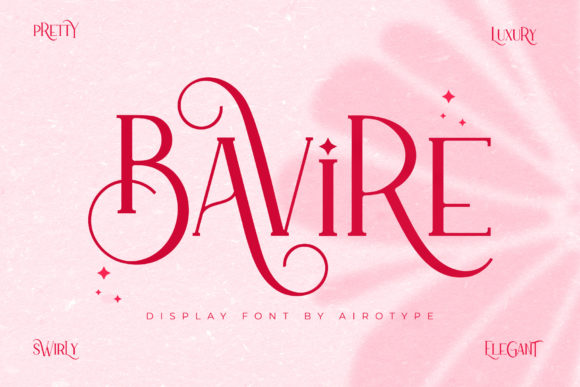
In the vast landscape of digital typography, selecting a font that balances elegance with functionality is crucial for any project. Bavire stands out as a sophisticated serif typeface designed to bring a high-end, stylish aesthetic to your work. It is not merely a collection of letters; it is a tool designed to convey class and professionalism. Whether you are a graphic designer working on a luxury brand identity, a blogger aiming for a polished editorial look, or a small business owner creating wedding invitations, the visual weight of your text matters.
One of the defining characteristics of Bavire is its technical accessibility. It is PUA (Private Use Areas) encoded, which means every glyph, swash, and stylistic alternate is accessible without requiring specialized design software. This feature opens the door for beginners and non-designers to utilize complex typographic features that were once reserved for professionals with expensive software licenses. However, simply having access to these tools is not enough; understanding how to deploy them effectively is where the true value lies.
The Trap of Over-Styling: A Common Pitfall
The most frequent mistake users make with fonts like Bavire is over-indulgence in its decorative features. Because the font offers extensive swashes and alternates, there is a temptation to use them everywhere. This often results in a design that looks cluttered rather than elegant. Imagine a wedding invitation where every single letter begins and ends with a flourish; the text becomes unreadable, and the intended sophistication turns into visual noise.
The issue here is a misunderstanding of typographic hierarchy. Elegant fonts rely on contrast. If every element is shouting for attention with ornate swashes, nothing stands out. This affects the usability of your design significantly. For instance, in logo design, a logo that is too complex can lose legibility when scaled down to a business card or a mobile favicon. The result is a loss of brand clarity and a potential decrease in professional credibility.
Better Approaches to Styling with Bavire
To avoid this, adopt a "less is more" philosophy. Use the standard character set of Bavire for body text or longer sentences to ensure readability. Reserve the stylistic swashes and special glyphs for initial letters, short headings, or specific focal points like a monogram. For example, if you are designing a social media post, use the ornate version of Bavire for the headline to grab attention, but pair it with a clean, sans-serif font for the description to ensure the message is communicated clearly.
Ignoring Context and Pairing Strategies
Another oversight is treating Bavire as a standalone solution for every typographic need. While it is a versatile serif, not every context suits a high-contrast, elegant typeface. Using it for dense technical documentation or long-form body text on small screens can lead to eye strain. Serif fonts with high contrast—where thick strokes are much thicker than thin strokes—can sometimes break down on low-resolution screens, making text difficult to decipher.
Furthermore, pairing Bavire with the wrong complementary font can create visual dissonance. Pairing it with another highly stylized script or a quirky display font often leads to a chaotic layout. The goal of font pairing is harmony, where each typeface supports the other without competing for dominance.
Practical Advice on Font Pairing
When using Bavire, consider pairing it with a neutral, geometric sans-serif font. Fonts like Montserrat, Lato, or Open Sans often work well because their clean lines provide a resting place for the eye, allowing the elegance of Bavire to shine without overwhelming the viewer. Always test your pairings in the specific medium where they will be used. A combination that looks stunning on a printed brochure might look cluttered on a mobile website.
Overlooking the PUA Encoding Advantage
A significant misunderstanding among users is not knowing how to leverage the PUA encoding of Bavire. Many users purchase the font, install it, and only ever type standard characters, completely unaware of the extensive library of swashes and ligatures available to them. This is a missed opportunity to elevate a design from "good" to "exceptional."
Conversely, some users struggle to access these features because they are using software that does not fully support glyph panels, such as basic text editors. This leads to frustration and the mistaken belief that the font is defective or that the seller misled them. In reality, accessing these features requires the right environment.
How to Access and Use Glyphs Correctly
To get the most out of Bavire, you must use software with a Glyphs panel or a Character Map. Programs like Adobe Illustrator, Photoshop, InDesign, or even free alternatives like Canva (in its Pro version) allow you to browse and select specific alternate characters. If you are a beginner, take time to learn where the "Glyphs" window is located in your preferred software. This knowledge allows you to cherry-pick the perfect flourish for a capital letter "B" or a unique ligature for "Th," adding a bespoke touch to your projects that standard typing cannot achieve.
Technical Checks Before You Commit
Before integrating Bavire into a major project, particularly for commercial use, it is vital to check the licensing terms. While Bavire is often available for commercial use, licenses vary. Some licenses cover desktop use (printing) but have different stipulations for web fonts or merchandise (print-on-demand). Failing to verify this can lead to legal complications or unexpected costs later on.
Additionally, always check for font updates. Designers occasionally release updates to fix kerning issues (the spacing between specific letter pairs) or to add new characters. Using an outdated version of the font file might mean you are working with inferior spacing, which can make text look uneven and unprofessional.
Final Checklist for Evaluation
Before you download and apply Bavire to your final design, run through this quick checklist:
- Compatibility: Does the font render well in the software you are using?
- Readability: Can you read the text easily at the intended size?
- Context: Does the font style match the tone of your message (e.g., formal, luxurious, editorial)?
- Licensing: Does your intended use (web, print, merchandise) align with the license you purchased?
By approaching Bavire with a strategic mindset—understanding its strengths, respecting its complexity, and utilizing its technical features correctly—you can ensure that your projects exude the elegance and professionalism you envision. It is a powerful tool, and like any tool, its effectiveness depends entirely on the skill and care of the person wielding it.