Groovy Stitch: A Designer's Guide to This Playful Appliqué Font
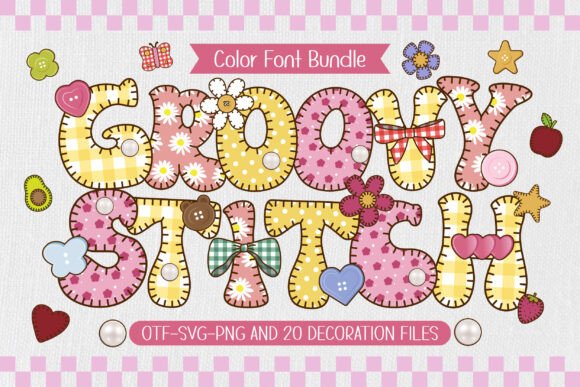
In a world saturated with clean, minimalist typography, there's a growing appreciation for fonts that feel handmade, textured, and full of personality. Enter Groovy Stitch, a unique typeface that captures the cozy, nostalgic charm of a classic craft project. It's not just a font; it's a statement. By blending the bold, confident style of 1970s groovy lettering with the intricate, tactile appearance of blanket stitch appliqué, this font offers a one-of-a-kind aesthetic. Rendered in cheerful pink and yellow tones with adorable fabric patterns, Groovy Stitch is designed to bring warmth and a retro flair to any creative endeavor. Whether you're a seasoned graphic designer, a small business owner creating custom merchandise, or a hobbyist working on a DIY project, this font promises to add a touch of handmade love to your work. But to unlock its full potential, it's crucial to understand its unique characteristics and avoid common pitfalls.
Understanding the Unique Nature of Groovy Stitch
At its core, Groovy Stitch is what's known as a color font (also called an SVG font). Unlike a standard font that is a single, solid color, a color font contains rich, embedded details—like textures, gradients, and patterns. This is what allows Groovy Stitch to look like actual yarn stitched onto fabric, complete with the subtle variations of pink and yellow. It also comes packed with 20 matching decorative doodles, featuring sewing materials like scissors, buttons, and thread spools, making it a complete design kit for craft-themed projects.
This richness is its greatest strength, but it's also the source of the most common mistakes. The very technology that makes it so visually appealing also makes it behave differently from the thousands of fonts you might already have installed. Treating Groovy Stitch like a standard TTF or OTF font will almost certainly lead to frustration and disappointing results. The key is to see it not just as a font file, but as a specialized graphic asset that requires a compatible environment to shine.
Avoiding the Compatibility Trap
The single most critical mistake users make is assuming universal compatibility. A designer might download Groovy Stitch, install it, and then try to use its colorful, textured version in Cricut Design Space for a custom t-shirt project, only to find it doesn't work as expected. This isn't a flaw in the font; it's a misunderstanding of the technology.
The Cricut Conundrum
It's essential to know that the full-color version of Groovy Stitch is not compatible with Cricut Design Space or similar cutting machine software that doesn't support SVG fonts. These programs are designed to interpret simple vector paths for cutting, not the complex, embedded graphic data of a color font. If you try to use the color version, the software will likely fail to render it correctly or at all.
The Better Approach: For your Cricut or Silhouette cutting projects, you must use the provided black version of the font. This version has been specifically created as a standard vector font, which cutting machines can easily read and cut. You can then use your machine's software to apply your own fill colors or use heat transfer vinyl (HTV) in the colors of your choice to achieve a similar crafty look. Always check the font files you've downloaded; a good creator will provide separate files for different use cases.
Software Requirements for the Color Version
To use the vibrant, textured pink and yellow version of Groovy Stitch, you need a design program that explicitly supports SVG color fonts. These include:
- Adobe Photoshop (CC 2017+)
- Adobe Illustrator (CC 2018+)
- Silhouette Studio (Designer Edition or higher)
- Inkscape (a free, open-source alternative)
Before purchasing or starting a project, verify that your software and its version support this font type. Using an older or incompatible program will result in the font appearing as a blank space or a series of broken characters. This is a simple check that can save you hours of troubleshooting.
Designing Effectively with Groovy Stitch
Once you're in the right software with the correct file, the next step is to use the font effectively. Its bold, decorative nature means it's not suited for every task. Using it improperly can make a design feel cluttered or illegible.
Focus on Headlines and Display Text
Groovy Stitch is a display font, meaning it's designed for short bursts of impactful text like headlines, logos, or single words. Its intricate stitch detail and thick letterforms would become overwhelming and difficult to read in a long paragraph. Imagine trying to read a full blog post in this font; it would be a visual nightmare.
A Realistic Example: Instead of using Groovy Stitch for an entire party invitation, use it for the headline "You're Invited!" or the guest of honor's name. Pair it with a simple, clean sans-serif font for the details like the date, time, and location. This creates a beautiful hierarchy, allowing the decorative font to stand out while the rest of the information remains clear and accessible.
Embrace the Decorative Doodles
A common oversight is forgetting about the 20 included doodle elements. These aren't just random extras; they are designed to complement the font's style. Users often spend time searching for separate sewing-themed graphics when they already have a perfectly matched set at their fingertips.
Practical Advice: Use the doodles to frame your text, create patterns, or add small, thematic accents to your design. For a sublimation tote bag design featuring the word "Sew," you could place the scissors and thread spool doodles nearby to create a complete, cohesive scene. This elevates the design from a simple word to a charming illustration, adding significant value to your final product.
Final Checks Before You Create
Before you commit to Groovy Stitch for a project, take a moment to evaluate your needs. This small investment of time ensures your final product is high-quality and meets your expectations.
- Verify Your Tools: Double-check which version of the font you need. Is your project for a cutting machine? Use the black version. Is it for a digital graphic or sublimation print? Ensure your software supports the color SVG version.
- Assess the Project's Needs: Is the text meant to be highly legible and professional, or is it meant to be fun and decorative? If it's the former, consider using Groovy Stitch for a small logo element and a more traditional font for the main text.
- Consider Your Audience: The playful, retro style of Groovy Stitch is perfect for children's crafts, DIY blog graphics, or a brand with a fun, handmade identity. It might be less appropriate for a formal corporate report, where it could undermine the message's seriousness.
By understanding its unique properties and applying it thoughtfully, you can harness the full creative power of Groovy Stitch. It's a fantastic tool for adding personality, warmth, and a touch of retro charm to your designs, helping you create projects that are not only beautiful but also genuinely connect with a love for handmade creativity.